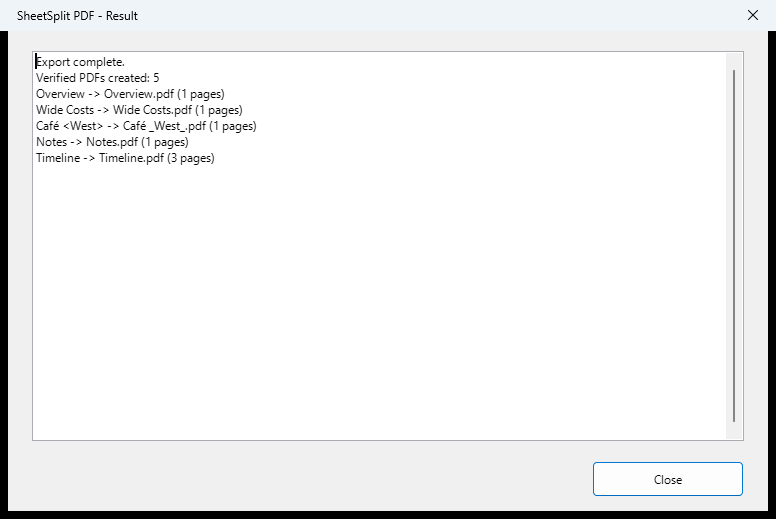
One file per sheet is different from one page per sheet
A sheet may have a landscape page style, several print ranges or multiple printed pages. Your goal may be five separate PDF files while one of those files contains three pages. Flattening every sheet onto one page changes that layout goal.
Before choosing any export workflow, inspect the workbook's native print preview. Check page styles, print ranges, headers, page breaks and fonts. Neither a batch exporter nor a PDF splitter can infer your intended layout from the sheet name.
The native/manual route
Native export is useful and may be the right choice for a small one-off job. A combined PDF followed by splitting is another workflow, but page boundaries and filenames then need care. The convenience gap is coordinating separate sheet exports and names, not a claim that Calc lacks PDF export.
- Open the workbook and review the print layout of the sheet you want to deliver.
- Use Calc's PDF export options and check the selection/range settings for the intended content.
- Save the PDF with a clear sheet-specific filename and inspect it.
- Repeat for the other sheets, keeping a checklist so a tab is not missed or an existing output accidentally replaced.
The SheetSplit workflow
SheetSplit PDF lets you select visible sheets, choose an existing local folder and review the planned filenames before exporting. It creates one PDF per selected sheet using the tested native print layout. Filename sanitation is visible in the preview.
Existing output files and duplicate planned names block the batch. The extension does not intentionally edit or save the source workbook; bytes and modified state stayed unchanged in the tested workflows. Review all generated PDFs before sending them on.
Check the fit before using it
Version 1.0.1 Experimental was tested with LibreOffice 26.8.0.3 Windows x64. It requires a locally saved, unencrypted ODS with no unsaved changes. It does not accept XLS, XLSX or CSV and does not export hidden sheets.
Network folders, PDF merging, multiple-workbook queues, email and scheduling are outside this release. Cloud-synchronized folders are untested. Complex workbooks and fonts may behave differently; a stopped batch can leave completed PDFs and a disk failure can leave a partial file. This is a bounded utility, not a universal document-conversion service.